
Connect. Secure. Manage.
Catalyst Access Switching
Design and deploy Cisco Catalyst access layers around endpoint numbers, uplink capacity, power requirements and the controls needed at the network edge.
Devices supported
across the UK
Client locations
supported
Traffic handled
at peak time
Average
response time
Average response is not a resolution time or a contractual guarantee. Support scope and response commitments are agreed for each engagement.
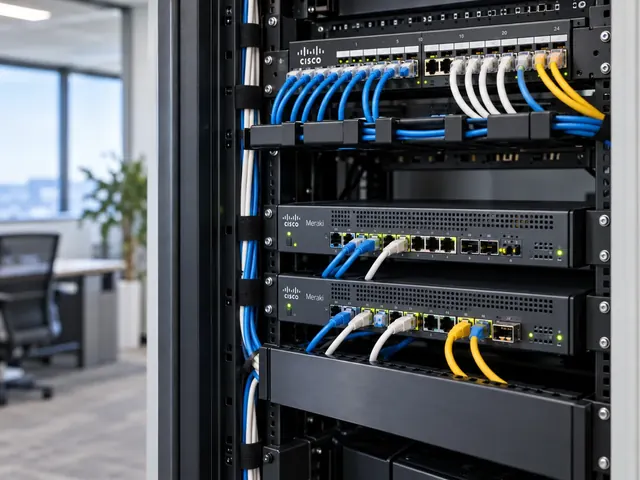
Catalyst access switching connects desks, phones, Wi-Fi access points, cameras and other devices to your network. Each port needs the right settings, power and path upstream. We design and install Cisco access switches around those needs. The aim is a consistent service across the site, with clear rules for who and what can connect.
Cisco-focused engineering
Design around the platform, traffic and failure behaviour you actually operate.
Change with evidence
Use pre-checks, acceptance criteria and a documented route back.
Operational handover
Keep the configuration, diagrams and responsibilities understandable after delivery.
Build the access layer from endpoint requirements
We begin by classifying connected devices and their support needs. A conventional workstation may need a 1 Gb/s port and 802.1X authentication. A modern wireless access point may need multigigabit network access and substantially more PoE power. Phones may use voice VLANs, while cameras and building systems often have different maintenance and access arrangements. The port plan should describe these differences clearly.
Endpoint counts alone do not determine the switch choice. We account for spare capacity, port speed, uplink bandwidth, power supply headroom, rack setup and the support lifecycle. A floor with 48 connected devices is not necessarily well served by a single 48-port switch if a failure would disconnect an entire department. Equally, unnecessary hardware duplication can increase complexity without materially improving resilience.

Standards & partnerships
Confidence in the team behind your network.
 Cisco Partner
 Cisco Meraki
 Cyber Essentials
 Cyber Essentials Plus
MCI Network Services is operated by Proxar Ltd. Certifications apply to the certified legal entity and the scope of its certificates. View accreditation information
PoE and multigigabit capacity
Power over Ethernet deserves its own calculation. The total available switch power budget must be compared with realistic device draw, including start-up behaviour and future additions. We review the power classes of access points, telephones and other devices, and document what happens if a power supply fails or a stack operates with reduced power capacity. We do not assume that the sum of maximum port ratings is available simultaneously.
Multigigabit access can be appropriate for high-throughput wireless rollouts. But the complete path matters. A faster access port cannot overcome a congested uplink, unsuitable cabling or a narrow internet circuit. We assess cabling standards, transceiver choices, port profiles and the expected app traffic before recommending an upgrade. The result is a capacity plan that can be checked against measured demand rather than a headline throughput figure.

A useful starting point
Not sure where to start?
Bring the requirement. We will help you define the engineering work.
Authentication and access policy
Where 802.1X is used, the access layer must cooperate with the identity service, endpoint supplicant and agreed policy. We set out which devices use certificate-based authentication, which require another approved method and how exceptional devices will be handled. For Cisco setups, integration with Identity Services Engine may support centralised authorisation and segmentation. But it introduces dependencies that require service ownership.
The failure behaviour matters as much as the successful authentication path. What happens if a RADIUS server is unavailable? Can a critical device still operate under a defined contingency policy? How are failed authentications diagnosed without disabling controls for an entire floor? We document these decisions with the customer rather than inventing a universal policy. Guest access, corporate access and operational technology should not be conflated simply because they share the same switch hardware.

Different environments. The same care.
Built around the work
your network supports.
Finance, banking and the wider private sector. We start with the systems and people that depend on your connections.
Finance & banking
Market-data paths, routing and provider coordination on clients’ behalf.
Financial-market services ↗Offices & multi-site teams
Reliable access between people, workplaces and business applications.
Office network design ↗Data centres & cloud
Network boundaries, workload connections and operational ownership.
Data centre networks ↗Protect against common Layer 2 faults
An unmanaged switch plugged into an office port can introduce a loop or unexpected bridge. We review spanning-tree edge settings, BPDU Guard, storm control, trunk restrictions and the admin process for authorised uplinks. The correct combination depends on the topology: BPDU Guard is valuable on genuine edge ports but should not be applied indiscriminately to intentional switch-to-switch connections.
We also consider MAC address limits, DHCP protection and source-validation features where supported and appropriate. Security controls should be tested against actual endpoint behaviour, especially where devices change MAC addresses, use virtual interfaces or are moved between desks. A setting that looks secure in isolation can become an availability problem if nobody has tested it with the customer’s equipment.

Rollout and acceptance testing
Before installation we prepare port schedules, naming standards, management addressing, setup templates and a cabling verification plan. Existing switch settings are captured so that critical exceptions can be reviewed and deliberately carried forward or retired. Installation sequencing should reflect the building’s occupancy and the availability of fallback connections.
Acceptance testing goes beyond link lights. We check representative endpoints from each device class, PoE delivery, VLAN assignment, DHCP, DNS, voice operation, wireless uplinks and access to required apps. We also check the expected response to a disconnected uplink, failed stack member or loss of an authentication service where those scenarios are within the agreed scope. Test evidence is recorded so that the customer can distinguish a completed rollout from an unverified cutover.

Support after deployment
A managed access layer needs clear change control. New devices, port moves, software updates and switch replacements should follow documented procedures, with records of the settings kept current. Monitoring can highlight interface errors, abnormal port flaps and power issues. But it cannot determine the business impact without context. We agree who triages alerts, who approves changes and when a site visit is required.
MCI works with Cisco and Meraki networking across the UK, particularly London and the surrounding counties, including Kent, Sussex, Essex and Berkshire. If you are planning a new office, a wireless refresh or a Catalyst replacement, share the floor plans, endpoint mix and current switch estate. We can develop an access-layer design with measurable acceptance criteria and a support model suited to your team.

Talk to a specialist
What does your network need next?
Tell us what you are planning, changing or trying to improve. We will help define a practical next step and the engineering scope.
+44 203 196 6566Choose option 1
sales@proxar.co.ukUK-wide service.
Most of our engineers are based in Kent, with a focus on London, Sussex, Essex and Berkshire.
Existing customers should use their agreed support and escalation channels. This form is for service enquiries, not a monitored emergency ticket.
Tell us what you need.
A short outline is enough. Please do not include passwords or sensitive network details.
Thank you. Your enquiry has been submitted.
Please check your name, email and message, then try again.
Your form session expired. Please try again.
Please wait a minute before sending another enquiry.
We could not submit your enquiry. Please call or email us instead.