
Connect. Secure. Manage.
Meraki Wireless Deployment
Configure and commission Meraki-managed access points with validated switching, power and SSID settings, followed by user and application testing.
Devices supported
across the UK
Client locations
supported
Traffic handled
at peak time
Average
response time
Average response is not a resolution time or a contractual guarantee. Support scope and response commitments are agreed for each engagement.
Meraki wireless deployment installs and tests the service described by the approved design. We prepare Dashboard, access points, switch power, identity and address services with the site team. Client tests check the agreed workflows. The handover also covers support, so an online access point is not mistaken for a complete, accepted Wi-Fi service.
Coverage and capacity
Design Wi-Fi around the spaces, devices and traffic that depend on it.
Secure access
Align authentication, segmentation and guest access with the wider network.
Measured performance
Validate roaming, interference and user experience instead of relying on signal bars.
Confirm the design and deployment inputs
Before setup begins, we review the placement plan, chosen access points, intended SSIDs and the client needs. We identify any unresolved decisions about authentication, guest access or forwarding. A rollout should not rely on engineers inventing those policies during installation because an equipment order arrived before the service design was agreed.
The site plan also covers cabling, mounting, power and access arrangements. We establish who provides each element and which checks must be completed before the wireless team attends. Where the design came from a predictive model, we identify assumptions that need on-site confirmation. Installation changes are recorded and assessed rather than allowing access points to be moved wherever a convenient cable happens to exist.

Standards & partnerships
Confidence in the team behind your network.
 Cisco Partner
 Cisco Meraki
 Cyber Essentials
 Cyber Essentials Plus
MCI Network Services is operated by Proxar Ltd. Certifications apply to the certified legal entity and the scope of its certificates. View accreditation information
Prepare the customer’s dashboard environment
We confirm organisation ownership, licensing and the access available to the rollout team. Devices are assigned to the correct network with meaningful names and site information. Administrator permissions, alert recipients and setup ownership are agreed before production use. So the customer does not depend on an installer’s personal account after handover.
Where templates or common profiles are used, we check how the site inherits settings and which local values are permitted. A multi-site rollout needs consistency without hiding genuine differences in addressing, uplinks or app access. The setup record identifies those exceptions and the process for changing them, reducing the risk that a later central edit affects a site unexpectedly.

A useful starting point
Not sure where to start?
Bring the requirement. We will help you define the engineering work.
Stage wireless and upstream configuration together
The intended SSIDs, security methods and forwarding arrangements are prepared alongside switch-port and network-service needs. VLANs, DHCP scopes, DNS and identity services must be ready for the clients that will connect. We coordinate with their owners rather than treating them as external details to investigate only after users report that the new wireless network has no usable network access.
Client preparation can be as important as network setup. Certificates, managed profiles and supported drivers may be required for the chosen authentication or roaming features. We identify that work early and test representative endpoints. A successful connection from the engineer’s laptop is not enough evidence that the customer’s handhelds, meeting systems or managed devices are ready.

Different environments. The same care.
Built around the work
your network supports.
Finance, banking and the wider private sector. We start with the systems and people that depend on your connections.
Finance & banking
Market-data paths, routing and provider coordination on clients’ behalf.
Financial-market services ↗Offices & multi-site teams
Reliable access between people, workplaces and business applications.
Office network design ↗Data centres & cloud
Network boundaries, workload connections and operational ownership.
Data centre networks ↗Install and verify the physical service
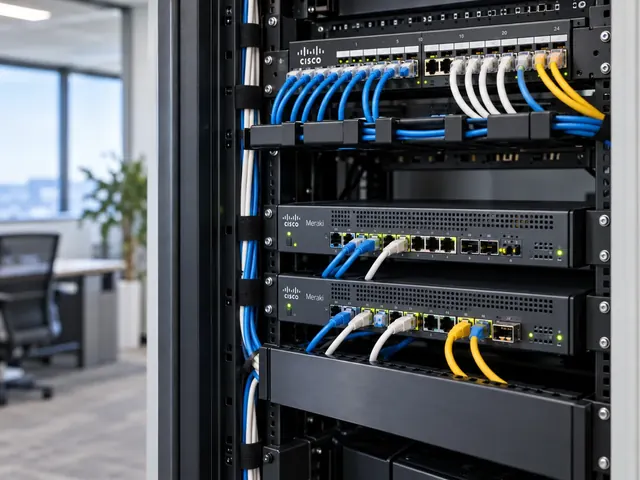
Access points are installed in the approved positions and orientation, with the correct supported mounting and antenna arrangements. We check device identity, power and uplink negotiation, then compare the installed layout with the design. A reduced power allocation or unexpected link speed can limit operation even when the device reports healthy management network access.
We also inspect the relevant switch-port setup and any interface errors. The rollout record should connect each access point to its physical location and upstream port. This is useful during an incident when the helpdesk knows only which room is affected. Clear labels and records reduce time spent tracing cables or guessing which dashboard device corresponds to a ceiling-mounted unit.

Test connection, access and movement
Commissioning includes association, authentication, addressing and access to agreed apps. Corporate and guest services receive separate checks, including paths that should be denied. Where discovery or media devices are involved, we test the actual workflow rather than assuming that an SSID with internet access meets every need in the room.
Roaming tests use representative clients and routes where mobility is in scope. We record the app behaviour and relevant events so any interruption can be attributed appropriately. A Wi-Fi validation survey can provide broader post-installation evidence. The acceptance record identifies limitations and follow-up work, especially where the building is not yet occupied at its expected density.

Hand over a service that can be maintained
The final package includes the installed inventory, setup principles, access duties and test results. We confirm who receives alerts, how faults are raised and how software or policy changes will be approved. Temporary installation access is removed or reduced according to the agreed plan, and outstanding issues retain a named owner rather than disappearing into a generic completion email.
MCI can deliver a single-site rollout or coordinate a staged rollout across UK locations. Our Meraki wireless services can also cover design and ongoing specialist support. The proposal separates physical installation, setup, endpoint preparation and acceptance so the customer knows what is included and which dependencies must be supplied by another team before the site can be considered ready.
Technical references
- Meraki enterprise wireless architecture — Cisco / Cisco Meraki
- Conducting site surveys with MR access points — Cisco / Cisco Meraki
Talk to a specialist
What does your network need next?
Tell us what you are planning, changing or trying to improve. We will help define a practical next step and the engineering scope.
+44 203 196 6566Choose option 1
sales@proxar.co.ukUK-wide service.
Most of our engineers are based in Kent, with a focus on London, Sussex, Essex and Berkshire.
Existing customers should use their agreed support and escalation channels. This form is for service enquiries, not a monitored emergency ticket.
Tell us what you need.
A short outline is enough. Please do not include passwords or sensitive network details.
Thank you. Your enquiry has been submitted.
Please check your name, email and message, then try again.
Your form session expired. Please try again.
Please wait a minute before sending another enquiry.
We could not submit your enquiry. Please call or email us instead.