
Connect. Secure. Manage.
Meraki Cloud Switching
Deploy Meraki-managed switching, including MS switches and supported Catalyst cloud-management modes, with clear feature and migration checks.
Devices supported
across the UK
Client locations
supported
Traffic handled
at peak time
Average
response time
Average response is not a resolution time or a contractual guarantee. Support scope and response commitments are agreed for each engagement.
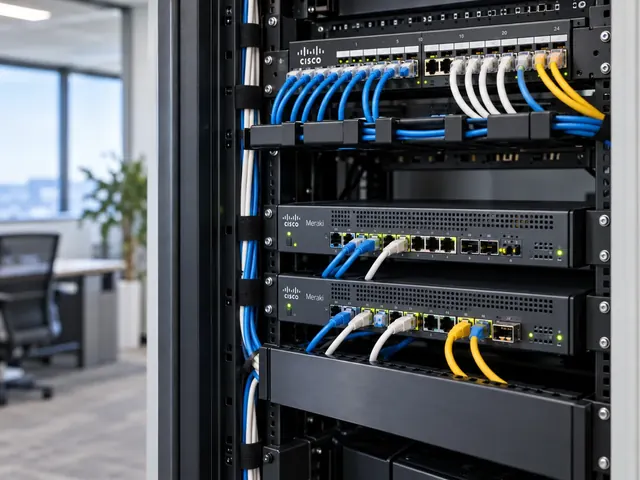
Meraki cloud switching lets teams manage switches through Dashboard while those devices carry local traffic. We plan uplinks, power, access boundaries and recovery for the supported models. The scope can include MS switches and eligible Catalyst options. The choice follows the features and support tasks your network needs, with clear ownership after handover.
Dashboard clarity
Structure organisations, networks and permissions around real operational ownership.
Consistent sites
Use repeatable standards without ignoring the differences between locations.
Practical operations
Keep cloud management connected to physical links, users and business services.
Choose the switching role first
An access switch serving office desks has a different job from a distribution switch carrying several buildings. We identify port demand, powered endpoints, uplink capacity and the location of routed gateways before assessing equipment suitability. Growth and degraded operation matter too: losing one uplink should not leave a critical site with insufficient capacity simply because the normal-state design looked comfortable.
The review distinguishes Layer 2 forwarding, Layer 3 routing and security enforcement. A switch capable of creating VLANs is not automatically capable of every routing or segmentation feature required by the business. We check the actual model, firmware and licence combination, including any interaction with current Cisco infrastructure. Unsupported assumptions are resolved before the setup is built or hardware is committed to a site.

Standards & partnerships
Confidence in the team behind your network.
 Cisco Partner
 Cisco Meraki
 Cyber Essentials
 Cyber Essentials Plus
MCI Network Services is operated by Proxar Ltd. Certifications apply to the certified legal entity and the scope of its certificates. View accreditation information
Understand the management model
MS switching and Catalyst cloud-management modes do not have identical setup or migration behaviour. We identify where setup is authoritative and which tools engineers will use for changes and diagnostics. A feature available through a local Catalyst setup may have different support or workflow in a cloud-configured rollout. The decision must preserve the services the customer actually needs.
Our Meraki management mode assessment compares these options in detail. The output is a supported operating model, not an assumption that a device can change mode without disruption. For inherited networks, we also establish admin ownership, entitlement and recovery access so that a hardware refresh does not conceal an unresolved dashboard-control problem.

A useful starting point
Not sure where to start?
Bring the requirement. We will help you define the engineering work.
Design the physical network properly
We review cabinet layout, fibre or copper paths, optics, power supplies and environmental conditions. Cloud management does not remove the risk of a shared power feed or two uplinks using the same damaged cable route. Where stacking is proposed, the supported member combinations and failure behaviour are checked. Dashboard-based management of several switches is not the same thing as a physical stack with a particular redundancy design.
Access ports need settings appropriate to their connected devices. Staff laptops, phones, access points, printers and building systems may require different treatment for VLANs, authentication and power. We establish a port-role plan and document exceptions. The design also identifies where loop protection belongs, avoiding a universal access-port template applied to infrastructure links that legitimately carry different traffic.

Different environments. The same care.
Built around the work
your network supports.
Finance, banking and the wider private sector. We start with the systems and people that depend on your connections.
Finance & banking
Market-data paths, routing and provider coordination on clients’ behalf.
Financial-market services ↗Offices & multi-site teams
Reliable access between people, workplaces and business applications.
Office network design ↗Data centres & cloud
Network boundaries, workload connections and operational ownership.
Data centre networks ↗Keep routing and security boundaries visible
Gateway placement determines which device controls traffic between networks. We trace the path to local servers, remote sites and the internet, then identify where firewall or group-based policies are enforced. Moving routing from an edge appliance to a switch can change the inspection path even when users retain network access. That security consequence needs clear approval and testing, not just a successful ping.
Where advanced segmentation is required, feature eligibility and end-to-end transport are assessed separately. A dashboard option does not prove that every device along the path understands or enforces the policy. We document what is supported, what needs an integration and what should remain on another platform. The Meraki Layer 3 Switching service addresses the routing part of this work.

Commission against agreed outcomes
Installation includes staging, correct inventory assignment and a controlled first connection. We check software state, port mappings, power delivery and uplink behaviour before handing the site over. Representative app tests confirm that users reach the intended services and that restricted paths remain restricted. Failure tests are agreed according to risk to the live service, with untested scenarios clearly identified rather than represented as proven resilience.
The handover links dashboard records to physical equipment. It includes a port map, management duties, monitored conditions and the recovery process for a failed member or replacement device. Engineers should be able to identify which switch serves an affected endpoint without searching through ambiguous names or relying on the person who performed the installation.

Engineering support beyond installation
MCI can deliver a switching project, review an inherited estate or provide ongoing operational assistance under an agreed scope. Our Cisco and Meraki network services cover UK sites, from individual offices to multi-site businesses. The Meraki MS Switch Deployment service provides a focused rollout route once the design is agreed, while lifecycle and management duties remain clear in the support arrangement rather than implied by the hardware purchase.

Technical references
- Cloud management with IOS XE overview — Cisco / Cisco Meraki
- Switch port configuration — Cisco / Cisco Meraki
Talk to a specialist
What does your network need next?
Tell us what you are planning, changing or trying to improve. We will help define a practical next step and the engineering scope.
+44 203 196 6566Choose option 1
sales@proxar.co.ukUK-wide service.
Most of our engineers are based in Kent, with a focus on London, Sussex, Essex and Berkshire.
Existing customers should use their agreed support and escalation channels. This form is for service enquiries, not a monitored emergency ticket.
Tell us what you need.
A short outline is enough. Please do not include passwords or sensitive network details.
Thank you. Your enquiry has been submitted.
Please check your name, email and message, then try again.
Your form session expired. Please try again.
Please wait a minute before sending another enquiry.
We could not submit your enquiry. Please call or email us instead.