
Connect. Secure. Manage.
Catalyst Device Configuration
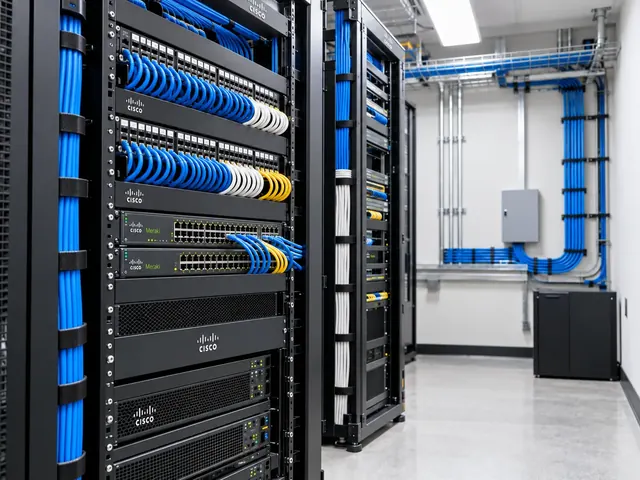
Enable supported Catalyst cloud management with device configuration, retaining local configuration ownership while adding dashboard visibility and tools.
Devices supported
across the UK
Client locations
supported
Traffic handled
at peak time
Average
response time
Average response is not a resolution time or a contractual guarantee. Support scope and response commitments are agreed for each engagement.
Catalyst device configuration keeps eligible switches under device-led control while adding supported Meraki Dashboard visibility and tools. We assess whether that mode fits your IOS XE needs and support process. The plan covers onboarding and how local and cloud access will coexist. Features vary by platform, and this is distinct from the retired Cloud Monitoring service.
Dashboard clarity
Structure organisations, networks and permissions around real operational ownership.
Consistent sites
Use repeatable standards without ignoring the differences between locations.
Practical operations
Keep cloud management connected to physical links, users and business services.
Decide what should remain device-managed
The starting point is the current setup and the reason it needs to remain authoritative. A campus may use routing, automation or service controls that are better served through the supported device setup model. We identify those needs and compare them with the alternative Catalyst cloud configuration approach. The choice should follow the network’s needs rather than a preference for one interface.
We also establish what the customer expects from dashboard integration. Visibility, fault diagnostics and remote command-line access are different aims and may have different prerequisites. Each requested capability is checked against the current platform, software and licence combination. The project records what is supported now and does not include unconfirmed roadmap features in its acceptance criteria.

Standards & partnerships
Confidence in the team behind your network.
 Cisco Partner
 Cisco Meraki
 Cyber Essentials
 Cyber Essentials Plus
MCI Network Services is operated by Proxar Ltd. Certifications apply to the certified legal entity and the scope of its certificates. View accreditation information
Assess onboarding prerequisites
We inspect the exact switch models, software versions, stack or chassis arrangement and current admin controls. The supported registration workflow and cloud identifiers are checked for those devices. Stacked or modular systems need the correct set of identities represented in the destination network; treating a single visible serial as the whole system can produce an incomplete onboarding record.
Management network access is reviewed before enabling the integration. Addressing, routing, DNS and upstream filtering must allow the required connection without creating unnecessarily broad access. We check how the switch reaches management services and whether a future routing change could break that path. The plan includes a way to troubleshoot locally if cloud access is not yet available or becomes interrupted.

A useful starting point
Not sure where to start?
Bring the requirement. We will help you define the engineering work.
Keep configuration ownership unambiguous
Retaining local setup does not mean every engineer can use every available tool without coordination. We set out which team owns changes, which tools are permitted and how their activity is recorded. Existing automation may continue to make changes. So it must be included in the operating model. Two independent processes updating the same setup can create drift even when both are individually authorised.
Cloud CLI access, where supported, is reviewed for its actual permissions and organisational settings. We do not assume that opening a terminal through the dashboard is equivalent to granting unrestricted setup access. The customer approves the intended access level and any extra authentication controls. Support engineers need to understand whether a session is diagnostic, privileged or subject to a separate approval before making a change.

Different environments. The same care.
Built around the work
your network supports.
Finance, banking and the wider private sector. We start with the systems and people that depend on your connections.
Finance & banking
Market-data paths, routing and provider coordination on clients’ behalf.
Financial-market services ↗Offices & multi-site teams
Reliable access between people, workplaces and business applications.
Office network design ↗Data centres & cloud
Network boundaries, workload connections and operational ownership.
Data centre networks ↗Introduce the integration safely
The rollout begins with setup evidence, admin recovery checks and a defined change window where needed. We follow the supported registration process for the chosen software and check the destination organisation and network before claiming identifiers. Any new management-related setup is documented so that future audits can distinguish it from unrelated customer settings.
For a larger estate, a pilot should represent the important differences: standalone switches, stacks, routing roles and restricted management networks where applicable. A successful onboarding on one laboratory switch does not prove suitability for every production device. We compare the observed behaviour with the acceptance plan and resolve exceptions before expanding the rollout to further sites or hardware combinations.

Prove that local operations still work
Validation includes both dashboard visibility and the current operating procedures. We confirm that local access, setup saves, approved automation and operational monitoring continue to function as intended. Reload or recovery behaviour is considered where the project scope permits safe testing. A change that improves central visibility but leaves an undocumented local persistence problem is not a complete rollout.
We also check the forwarding services that matter to the customer. Representative traffic should still follow the approved paths, and management integration should not weaken access controls or consume unexpected resources. Results are recorded with any limitations. The support team receives clear instructions for distinguishing a cloud-management fault from a switching or routing fault, avoiding unnecessary disruption when only visibility is affected.

Document removal and future change
The handover explains the integration’s ownership, permissions, software prerequisites and supported removal process. Offboarding should remove obsolete management setup without deleting unrelated customer controls. Future software upgrades or changes in management mode require a fresh compatibility check. MCI can deliver this work as part of Meraki management mode assessment or a focused onboarding project, leaving the customer with a deliberate hybrid operating arrangement rather than an uncertain mixture of local and cloud administration.

Technical references
- Enable cloud management with device configuration — Cisco / Cisco Meraki
- Cloud CLI for cloud-managed IOS XE switches — Cisco / Cisco Meraki
Talk to a specialist
What does your network need next?
Tell us what you are planning, changing or trying to improve. We will help define a practical next step and the engineering scope.
+44 203 196 6566Choose option 1
sales@proxar.co.ukUK-wide service.
Most of our engineers are based in Kent, with a focus on London, Sussex, Essex and Berkshire.
Existing customers should use their agreed support and escalation channels. This form is for service enquiries, not a monitored emergency ticket.
Tell us what you need.
A short outline is enough. Please do not include passwords or sensitive network details.
Thank you. Your enquiry has been submitted.
Please check your name, email and message, then try again.
Your form session expired. Please try again.
Please wait a minute before sending another enquiry.
We could not submit your enquiry. Please call or email us instead.