
Connect. Secure. Manage.
Meraki Hardware Replacement
Replace failed or retiring Meraki equipment using a model-aware plan for claiming, configuration, licensing and verification at the affected site.
Devices supported
across the UK
Client locations
supported
Traffic handled
at peak time
Average
response time
Average response is not a resolution time or a contractual guarantee. Support scope and response commitments are agreed for each engagement.
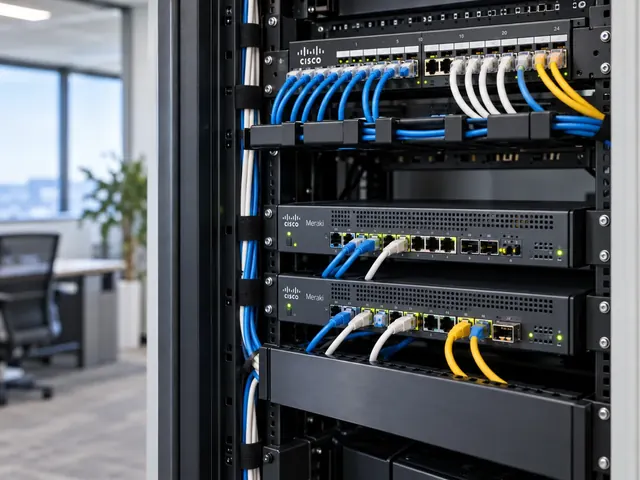
Meraki hardware replacement covers the engineering needed to swap a failed or ageing device. We check supported models, settings, physical links and the tests needed after the swap. Ownership of the setup must remain clear. Equipment supply, warranty decisions and licence rights are stated in the scope, rather than assumed to be included.
Dashboard clarity
Structure organisations, networks and permissions around real operational ownership.
Consistent sites
Use repeatable standards without ignoring the differences between locations.
Practical operations
Keep cloud management connected to physical links, users and business services.
Decide whether this is a replacement or a redesign
A like-for-like spare and a newer model are not equivalent changes. Port layouts, power needs, throughput, feature support and management behaviour can differ. We compare the proposed unit with the service the old equipment actually delivers, including any less visible dependencies such as optics, stack connections or local management settings.
The reason for replacement also matters. If a switch is being changed after repeated errors, we review the evidence before assuming the chassis is at fault. Cabling, power and upstream problems can remain after a new device is installed. A planned refresh allows more design work. An urgent recovery may require a temporary supported arrangement followed by a separate improvement project.

Standards & partnerships
Confidence in the team behind your network.
 Cisco Partner
 Cisco Meraki
 Cyber Essentials
 Cyber Essentials Plus
MCI Network Services is operated by Proxar Ltd. Certifications apply to the certified legal entity and the scope of its certificates. View accreditation information
Capture the configuration and physical context
We record the current device identity, network assignment, interface use and relevant settings before removing equipment. Switch-port labels and photographs of authorised rack connections can prevent avoidable mistakes during a busy change window. For wireless equipment, mounting position, antenna arrangement and uplink power are part of the service, not incidental installation details.
A replacement security appliance requires attention to WAN addressing, provider equipment, VPN dependencies and any restrictions tied to a public address. We establish who can resolve an upstream handoff problem and whether the carrier needs advance notice. These practical checks are especially important when the engineer performing the swap is not the person who originally built the network.

A useful starting point
Not sure where to start?
Bring the requirement. We will help you define the engineering work.
Verify the supported transfer method
Cisco documents different replacement and cloning procedures for different product families. We select the method for the exact devices and network arrangement, checking firmware and setup implications. We do not promise that claiming a new serial number automatically transfers every operational detail, historical record or integration associated with the old unit.
Licensing and inventory ownership are confirmed before the maintenance window. The replacement must be available to the correct customer organisation, with the necessary authority to use it. Where Cisco support or a distributor is involved in a warranty exchange, we coordinate the technical steps with that process while keeping the commercial and engineering duties clearly separated.

Different environments. The same care.
Built around the work
your network supports.
Finance, banking and the wider private sector. We start with the systems and people that depend on your connections.
Finance & banking
Market-data paths, routing and provider coordination on clients’ behalf.
Financial-market services ↗Offices & multi-site teams
Reliable access between people, workplaces and business applications.
Office network design ↗Data centres & cloud
Network boundaries, workload connections and operational ownership.
Data centre networks ↗Prepare the swap so local work is predictable
The change plan identifies cables, rack positions, power connections and the order in which interfaces are restored. Where feasible, we prepare the destination settings and confirm management network access before moving production traffic. We also define who is available on site and how the remote engineer will communicate if the primary network connection disappears.
A rollback option should be realistic. Retaining the old device is useful only when it can still operate and its setup remains recoverable. If the old hardware has failed completely, the contingency may involve another spare, a reduced service or escalation to the hardware provider. We document that distinction rather than describing every replacement as reversible in the same way.

Validate the complete service after installation
For a switch, we test representative access ports, uplinks, VLANs, authentication and powered endpoints. For an access point, we check the intended SSIDs, client connection and local radio coverage. For an MX, we check the relevant internet, routing, VPN and security-policy behaviour. The test scope follows the device’s actual duties.
We also inspect errors, power allocation and unexpected speed negotiation. A new unit can appear healthy while a reused optic or cable limits the service. Monitoring should identify the replacement correctly and send alerts to the right team. Any integrations that reference a serial number, device identifier or interface map are reviewed so operational visibility does not quietly break after the swap.

Reconcile assets and close the change
The final handover records the new serial number, installed location, setup status and test results. The old device’s inventory assignment, retained information and return or disposal route are handled according to the agreed ownership and data-handling process. We avoid leaving a faulty unit labelled as an available spare or a returned device still listed as an active production asset.
MCI’s Cisco and Meraki network services include planned refreshes and scoped replacement assistance across the UK. For a quotation, provide the current model, intended replacement and the functions that must be maintained. Where the change also involves an organisation move or management-mode change, we will treat it as a broader platform migration rather than understate the work as a simple box swap.

Technical references
- Cloud management with IOS XE overview — Cisco / Cisco Meraki
- Cloud CLI for cloud-managed IOS XE switches — Cisco / Cisco Meraki
Talk to a specialist
What does your network need next?
Tell us what you are planning, changing or trying to improve. We will help define a practical next step and the engineering scope.
+44 203 196 6566Choose option 1
sales@proxar.co.ukUK-wide service.
Most of our engineers are based in Kent, with a focus on London, Sussex, Essex and Berkshire.
Existing customers should use their agreed support and escalation channels. This form is for service enquiries, not a monitored emergency ticket.
Tell us what you need.
A short outline is enough. Please do not include passwords or sensitive network details.
Thank you. Your enquiry has been submitted.
Please check your name, email and message, then try again.
Your form session expired. Please try again.
Please wait a minute before sending another enquiry.
We could not submit your enquiry. Please call or email us instead.