
Connect. Secure. Manage.
Meraki Wi-Fi 7 Deployment
Plan and deploy supported Wi-Fi 7 access points under Meraki management, with a validated design, compatible infrastructure and practical client testing.
Devices supported
across the UK
Client locations
supported
Traffic handled
at peak time
Average
response time
Average response is not a resolution time or a contractual guarantee. Support scope and response commitments are agreed for each engagement.
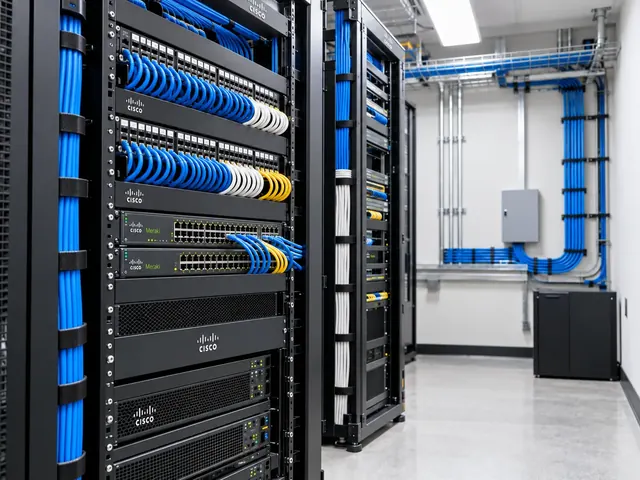
Meraki Wi-Fi 7 deployment brings supported Cisco hardware into a Dashboard-managed wireless design. We prepare power, switching, security and client compatibility for the site, then test the intended service. The result must work for the devices your people use. A new access point running default settings is only a starting point.
Coverage and capacity
Design Wi-Fi around the spaces, devices and traffic that depend on it.
Secure access
Align authentication, segmentation and guest access with the wider network.
Measured performance
Validate roaming, interference and user experience instead of relying on signal bars.
Confirm the supported hardware and operating mode
We check the chosen access-point models, firmware, licensing and intended management arrangement before installation. Cisco wireless hardware can have specific operating-mode and feature needs. So the project identifies exactly what will be deployed. A product family name alone is not enough to establish that the planned dashboard functions are available on the chosen device and release.
The organisation and network ownership are agreed with the customer. Inventory claims, administrator access and any current templates are reviewed before devices are assigned. Where the rollout replaces earlier equipment, we document which setup can be reused and which settings need deliberate redesign. The customer retains the agreed admin and recovery rights rather than relying on temporary project access after handover.

Standards & partnerships
Confidence in the team behind your network.
 Cisco Partner
 Cisco Meraki
 Cyber Essentials
 Cyber Essentials Plus
MCI Network Services is operated by Proxar Ltd. Certifications apply to the certified legal entity and the scope of its certificates. View accreditation information
Prepare ports, power and installation positions
The switch ports feeding the access points are checked against the actual power and Ethernet needs. We examine total PoE headroom, cabling, uplinks and the expected effect of losing a power supply or switch member where resilience matters. An access point being reachable does not prove it has the power needed for every intended radio or feature.
Placement follows the wireless design and survey evidence. Reusing mounting positions may be practical, but changes in coverage needs, antenna behaviour or building use need review. We confirm installation access and any facilities work before the commissioning window. The final record includes the actual position and switch-port mapping, which gives the support team a reliable starting point when a future fault affects one part of the building.

A useful starting point
Not sure where to start?
Bring the requirement. We will help you define the engineering work.
Configure wireless services for the device estate
We set out the required network names, authentication, addressing and access boundaries. Staff, guest and specialist devices may need different treatment, but extra SSIDs should have a clear purpose. The setup is kept understandable rather than expanding every legacy exception into another wireless network. Existing security assumptions are reviewed against the new operating mode and current platform support.
Wi-Fi 7 and 6 GHz use require compatible client and security settings. We test the intended modes with representative endpoints, including devices that cannot use the newer capabilities. A compatibility path, where required, is designed clearly and separated appropriately. We do not treat the ability to connect an older client somewhere in the building as proof that it can use every new band or feature.

Different environments. The same care.
Built around the work
your network supports.
Finance, banking and the wider private sector. We start with the systems and people that depend on your connections.
Finance & banking
Market-data paths, routing and provider coordination on clients’ behalf.
Financial-market services ↗Offices & multi-site teams
Reliable access between people, workplaces and business applications.
Office network design ↗Data centres & cloud
Network boundaries, workload connections and operational ownership.
Data centre networks ↗Tune radio choices for the site
Channel width, band use and radio policy are chosen for the local setup and app demand. The widest available channel is not automatically the best choice in a busy building where neighbouring cells need usable spectrum. We assess airtime and reuse alongside coverage, using the proposed client population rather than assuming a small demonstration represents peak operation.
Where multi-link operation is part of the design, we check support and negotiation for the actual client combinations. Its presence on a feature list does not prove the mode in use or the resulting app benefit. Radio changes are introduced through a controlled baseline so that later troubleshooting can distinguish a change to the settings from a new environmental or client issue.

Commission with representative workflows
The pilot covers fresh authentication, address assignment, app access and mobility through the intended working areas. We include the customer’s relevant voice, collaboration or operational tasks rather than relying only on a throughput measurement. Tests also confirm prohibited paths remain blocked and that guest or specialist access has not inherited broader permissions during the refresh.
We record firmware, client versions and test conditions so results can be reproduced. Material problems are investigated before the rollout expands. Where a device exception remains, its effect and owner are documented. Dashboard status and client telemetry contribute useful evidence. But they are interpreted alongside endpoint and app observations rather than used as a substitute for them.

Hand over a manageable service
The completed rollout record includes device locations, network assignments, security settings, radio baseline and acceptance results. We set out who will handle firmware changes, new device requests and support escalation. Monitoring should identify meaningful loss of service or capacity, with an owner able to act on the alert rather than simply receiving it.
MCI’s Meraki wireless services can include ongoing operational support under a separately agreed scope. For a Wi-Fi 7 rollout, share the site plan, switch estate and client needs. We will prepare the prerequisites, setup and commissioning sequence needed to make the upgrade work as a complete network service, while preserving clear ownership of the setup after installation.
Technical references
- CW9176 wireless access-point datasheet — Cisco / Cisco Meraki
- WPA3 encryption and configuration — Cisco / Cisco Meraki
Talk to a specialist
What does your network need next?
Tell us what you are planning, changing or trying to improve. We will help define a practical next step and the engineering scope.
+44 203 196 6566Choose option 1
sales@proxar.co.ukUK-wide service.
Most of our engineers are based in Kent, with a focus on London, Sussex, Essex and Berkshire.
Existing customers should use their agreed support and escalation channels. This form is for service enquiries, not a monitored emergency ticket.
Tell us what you need.
A short outline is enough. Please do not include passwords or sensitive network details.
Thank you. Your enquiry has been submitted.
Please check your name, email and message, then try again.
Your form session expired. Please try again.
Please wait a minute before sending another enquiry.
We could not submit your enquiry. Please call or email us instead.